Virtual Machines on SQL Server 2022—Here’s How to Do It Without Software Assurance
Time and again, customers approach us to ask whether it’s possible to install virtual machines running SQL 2022. Unfortunately, this is (almost) no longer possible without paying for active Software Assurance from Microsoft.
However, there is a small “loophole” that still allows you to use virtual machines. Unfortunately, it’s no longer as affordable as it was in the 2019 version, where licensing just 4 cores was sufficient, but it could still be an option for some companies.
SQL 2022 Licensing in Detail
SQL Server 2022, like SQL Server 2019, is licensed by core. Up through and including version 2019, if you purchased a total of 4 cores, you could run one SQL license in a virtual machine. For many companies, this was a very attractive—and above all, cost-effective—way to license SQL.
With the release of version 2022, however, everything changed—from then on, if you wanted to install virtual machines, you had to purchase active Software Assurance in addition to the minimum requirement of 4 cores. This doubles the cost over a period of nearly 3 years.
Virtual Machine on SQL Server 2022 Without Software Assurance?
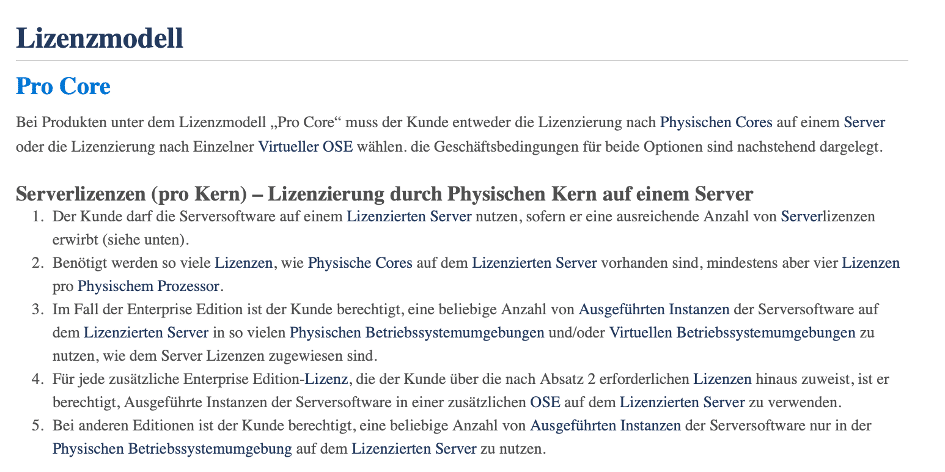
However, as mentioned above, there is a small “loophole”: If you license the Enterprise edition instead of the SQL 2022 Server Standard edition, you can install SQL on as many virtual machines as there are licensed cores. To do this, however, it is absolutely necessary to license the entire physical server on which SQL is to be installed.
For companies that require high capacity or run multiple instances in parallel for development, testing, and production, this could be a cost-effective option in the long run, despite the higher initial investment.
While this option is no longer as affordable as the 2019 licensing policy, it does offer a viable solution for some companies to adapt their IT infrastructure to meet the new requirements of SQL Server 2022 and continue to benefit from the scalability and advanced features of SQL technology.
Here is an excerpt from the Microsoft Product Terms (April 2024):
Sample Calculation: SQL Server 2022 Licensing for Virtual Machines
Here is a calculation example: A server with 4 physical processors, each with 4 cores, must be licensed with a total of 16 SQL Enterprise Core licenses (typically 8 x 2 Core Packs). SQL may then be installed on a total of 16 virtual machines (and/or physical instances) on this server.
To reduce costs, pre-owned software solutions are a smart option. Benefit from savings of up to 75% — with full functionality and uncompromised quality.
Media Coverage of Software ReUse









Conclusion on Virtual Machines in SQL 2022
Many will now rightly point out that SQL Enterprise licenses are significantly more expensive than the Standard edition.
SQL Server 2022 licensing involves significant differences in cost structures, particularly when choosing between the Standard and Enterprise editions. Many companies find that while SQL Enterprise licenses are initially more expensive than the Standard version, they offer long-term benefits, particularly when it comes to scaling and using advanced features.
However, at Software ReUse, used SQL 2022 Enterprise licenses are currently available at relatively low prices, so you can easily compare, through a customized quote, whether it’s more cost-effective to license 4 cores with Software Assurance or to license the entire server with used licenses.
Furthermore, the decision to license the entire physical server—particularly when using SQL Enterprise Edition—can be an efficient solution. This makes it possible to run multiple virtual instances at no additional cost, which can result in a reduction in overall costs, especially if a company has dynamically growing or varying requirements for its database infrastructure.
For companies that require advanced features available only in the Enterprise Edition, purchasing used licenses can be a smart and financially sound decision. Through targeted consulting, you can identify the best licensing strategies that take both technical requirements and budget into account.
In particular, if you also need features from the SQL Enterprise edition, purchasing used licenses and licensing the entire physical server can be a good, cost-effective alternative to the Software Assurance solution.
Our team will be happy to assist you!
Interested in buying or selling software for your organisation?
Our clients